Home

Watch4D is a program to investigate the importation of 3DS files supporting several issues that are problematic for almost all other 3DS importers.

  • Pivots that are translated or rotated.
  • Object instances.
  • Object Links.
  • Object Groups.

Watch4D is a modification of a program from elsewhere on this site called Watch3D. That program is unavailable for distribution in source form since it uses the CrossRoads library which is only available with a book.

Watch4D is based on open source code from CrystalSpace, and my own researches, so the source can be shared.

Downloads are here.


Version 1.7 Supports Links

Here's a presentation of this version.

Version 1.6 Supports Instances

Here's a presentation of this version.

Example

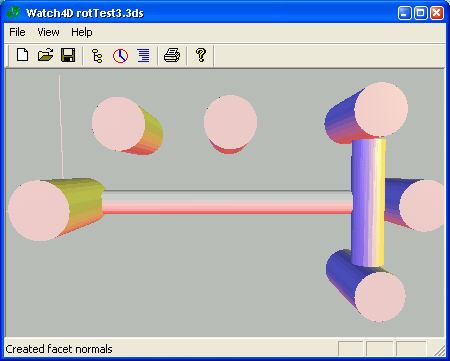
This scene was created using TurboCad 8.1 [TCW] and exported to 3DS format.

Here's the way this scene looks in Watch3D and almost every other 3DS importer. TCW, Max and gmax are the examples of programs that I have that appear to do importing and exporting of 3ds files correctly.

Notice that the objects positions and rotations are completely lost.

Here's the scene as it appears in Watch4D. All scenes don't render correctly. But clearly there is some progress. This scene does not have instances, but Pivots for the objects are translated and rotated.

Some Chunks Decoded

This is an excerpt from the output of Watch4D into the parse window as a file is opened:

CHUNK_KEYFRAMER(b000) Length 1469
--CHUNK_UNK_B00A Length 21
--CHUNK_FRAMES(b008) Length 14
--CHUNK_UNK_B009 Length 10
--CHUNK_KFOBJDES(b002) Length 169
----CHUNK_KFOBNODEID(b030) Length 8 - id: 0
----CHUNK_KFOBHIER(b010) Length 19 Cone01 - flags: 0x4000 0x0000 0xffff
----CHUNK_KFOB_B013(b013) Length 18 [0,0,100]
----CHUNK_KFOBPIVOT(b020) Length 38 [0,0,0]
----CHUNK_KFOB_B021(b021) Length 42 [1.5708,-1,0 0] []
----CHUNK_KFOB_B022(b022) Length 38 [1,1,1 -1.#QNAN] []
--CHUNK_KFOBJDES(b002) Length 171
----CHUNK_KFOBNODEID(b030) Length 8 - id: 1
----CHUNK_KFOBHIER(b010) Length 21 Sphere01 - flags: 0x4000 0x0000 0xffff
----CHUNK_KFOB_B013(b013) Length 18 [0,0,0]
----CHUNK_KFOBPIVOT(b020) Length 38 [0,0,0]
----CHUNK_KFOB_B021(b021) Length 42 [0,0,0 0] []
----CHUNK_KFOB_B022(b022) Length 38 [1,1,1 -1.#QNAN] []
--CHUNK_KFOBJDES(b002) Length 168
----CHUNK_KFOBNODEID(b030) Length 8 - id: 2
----CHUNK_KFOBHIER(b010) Length 18 Box01 - flags: 0x4000 0x0000 0xffff
----CHUNK_KFOB_B013(b013) Length 18 [0,0,0]
----CHUNK_KFOBPIVOT(b020) Length 38 [0,0,0]
----CHUNK_KFOB_B021(b021) Length 42 [0,0,0 0] []
----CHUNK_KFOB_B022(b022) Length 38 [1,1,1 -1.#QNAN] []
--CHUNK_KFOBJDES(b002) Length 182
----CHUNK_KFOBNODEID(b030) Length 8 - id: 3
----CHUNK_KFOBHIER(b010) Length 19 Cone01 - flags: 0x0000 0x0000 0xffff
----CHUNK_KFOB_B013(b013) Length 18 [0,0,100]
----CHUNK_KFOBNAME(b011) Length 13 Cone02
----CHUNK_KFOBPIVOT(b020) Length 38 [0,0,0]
----CHUNK_KFOB_B021(b021) Length 42 [1.82348,-0.774597,-0.447214 -0.447214] 
----CHUNK_KFOB_B022(b022) Length 38 [1,1,1 -1.#QNAN] []

Notice the chunks that describe the instances, and object pivots are in the keyframer chunk. There is a list of object descriptor chunks and the chunks inside of this describe the pivot and other object attributes that are key to correctly placing objects:

  • B010 is the base chunk name if the object is an instance, or the chunk name if this is not an instance. This name can always be used to find the mesh object that describes the geometry.
  • B011 is the instance name, if the object is an instance.
  • B020 contains the world coordinates of the pivot. [apparently]
  • B013 local coordinates of the pivot. That is the pivot relative to the mesh.
  • B021 rotation of the object around the pivot in world frame. This is a quat, of radians, and x, y, z of the direction of the axis of rotation. This turns out to be exactly what OpenGL needs to do a rotation most easily, except that OpenGL wants degrees rather than radians.
  • B022 appears to be the scale of the object so that each instance can have a separate scale.
  • 4160 appears in a mesh block under certain circumstances. This is key to the relocation process, but its use is not yet clear.

The process of interpreting these chunks and correctly displaying all scene geometry is not yet complete. However, already the program interprets scenes that other importers do not process correctly, so progress is being made.

For details of the decoding process, see the source code. I've found a couple of references to the 3ds file format from 1997 on the web, but neither of these sources has satisfactory explainations of these chunks or how to use them.

Downloads

Watch4D program

examples updated with latest files

Latest Watch4D source


History

  • Support links (parsing done, rendering not correct V1.7)
  • Support for instances.(done V1.6)
  • Support for modified pivots.(done V1.6)
  • Support for simple materials. But probably not smoothing groups.(done V1.6)
  • Rebuild the details dialog to report the H3dsScene components. (done V1.7)
   
Programs and images Copyright (c) 2002, Darrell Duffy.

15 Sept 2002